Player Names

TOP SECTION
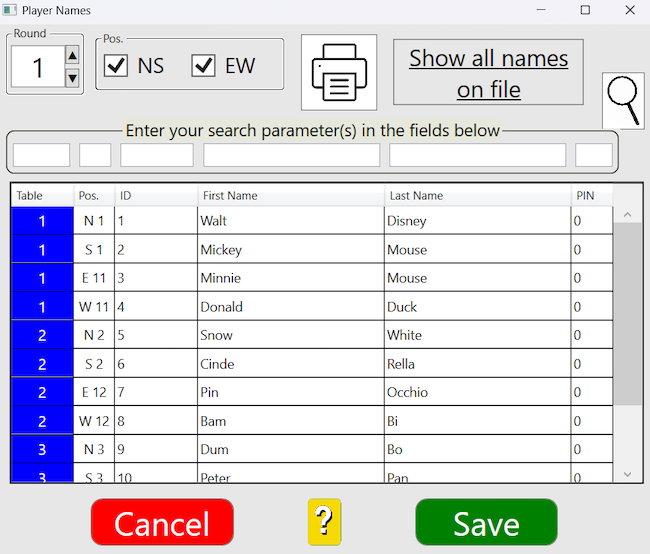
BTC will by default show the starting positions, you can select the round that you are interested in.
     Untick EW if you are only interested in NS.

Print
The name list will be printed in the sorted order, see further the headline THE TABLE below.

All names on file
All names on file means that all names that are available in the BridgeTab system will be shown. That is to say, not only those who participate in the current game. c.f. File/Import names.

Search

You can search for a table, a pair number, member ID, or name. Enter your search parameter(s) in the box(es) above the respective column and click the magnifying glass.

THE TABLE
The data is sorted in table and NSEW order by default. You can give a column priority by clicking on a column header. A second click on the same header will reverse the sort order.

CHANGING
Changes of table no. and/or compass direction at the table can only be made by the scoring program but the other parameters can be changed here by clicking on a cell in the grid.
    
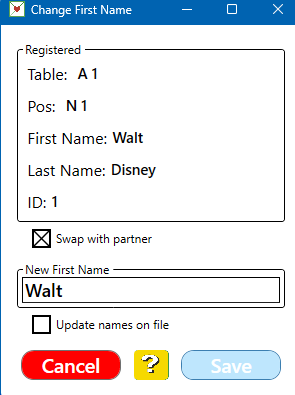
In the example shown to the right the first name will be permanently changed to Peter because the tickbox Update names on file is ticked.
     ID, last name and PIN can be edited in the same way.

Swap with partner
If two players have entered correct ID, but in the wrong positions, the fastest method to put it right is to click on either player´s name, tick Swap with partner and click Save.

ASSIGNED POSITIONS
See the memo Names for advice on how to handle names where the players are assigned seats (seeded).

REGISTER PAIRS ARRIVING LATE
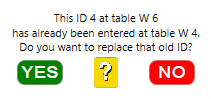
You can enter the ID(s) of player(s) arriving late by clicking on the ID cell for the round-table-compass direction combination for where the late player will start playing.

Help on this (control program)
index sitemap advanced
search engine by freefind


BridgeTab app (only)
index sitemap advanced
search engine by freefind


BOS (only)