|
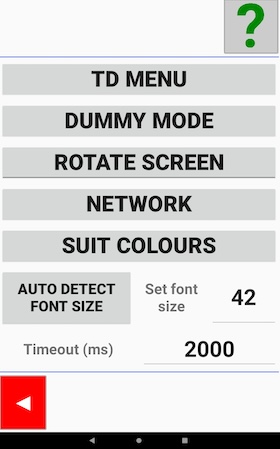
Settings like language, light, sound etc. are set in the Tablet’s Settings. That is to say, you have to leave the BridgeTab app momentarily if you want to change such settings.
TD MENU
Shortcut to the TD menu. Note that the default TD PIN ALWAYS works before game start but opens the TD menu in a limited version. See the TD menu page for advice on how to reset the PIN.
DUMMY MODE
Dummy mode works without connection to the PC as is therefore useful for training purposes. The settings for dummy mode are explained on a separate page,
Exit dummy mode
Click “Tournament mode” in the Settings menu (the Dummy mode button changes function to Tournament mode) to revert to normal BridgeTab function.
ROTATE SCREEN
BridgeTab will always show the screens upright. Click Rotate screen if your opinion about what should be “up” differ from the hardware maker’s.
NETWORK
The Network button is a shortcut to Android’s WiFi Settings. BridgeTab must be connected to the same network as the PC uses.
Timeout
You should consider to increase the timeout time if the WiFi signal is weak. The higher value you set, the longer it will take for each communication when the WiFi is poor, which might irritate the players.
Note that each table can have its own time out. You should increase the time out only at the tables where the communication is shaky.
|