
Movement change

GENERAL
The BridgeTabs will at start be loaded with EVERYTHING they need to run the game from A to Z. That is to say, they can run the entire sessionwithout connection with the PC once they have logged on. This is an advantage but you have to be careful when the original movement  has to be replaced. From this follows that you should not click the Start button in BTC unless you are sure that you have loaded a movement that will work for your event. The recommendation is that you should let the players register their IDs before you click the START button and that you require communication at least during the first round.

CHANGING THE MOVEMENT AFTER START

COMMUNICATION NOT REQUIRED
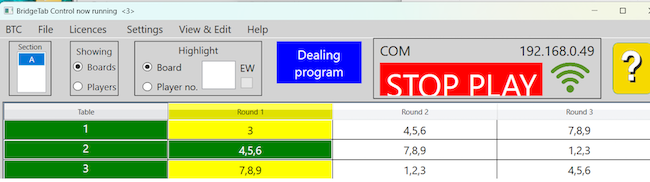
The problem is that there is no guarantee that the grid reflects the situation at the tables. BTC will alert you when tables are lagging considerably (table 3 seejs late and might become orange). But it can happen that a table that is out of range has played MORE boards than is shown in the grid and finished the round. If a BT has finished round, and you do not watch out, the BT will continue according to the original movement during the second round.
COMMUNICATION REQUIRED
There is no risk that any BridgeTab will pass the point when the new movement shall be used so long as communication is required. You are therefore advised to set the communication required parameter (in Additional Settings) to round 1, at least (default is 2).

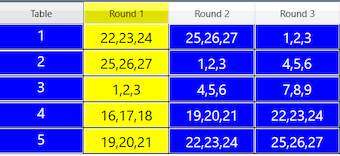
In the example shown above (with COM required through round 2), the tables are marked blue to indicate that they will not be permitted to leave the first round 2 until/unless they have loaded the updated movement data.

The table column will be green and cells in the grid will get their normal colours as soon as the tables have got the new movement. And the players will not notice the change if their BT is within range of the router.

The BT will tell the scorekeeper to bring the tablet closer to the router to communicate unsent results if the table is out of range.

you have to go to the lagging table to find out if it is slow or out of range.

You should not ask the players to move and click the Continue button in BTC unless you are sure that ALL ta bles have communicated all results.

The table column will be blue when a movement change is pending. The tables will become green when they have loaded the new movement.

EXAMPLES
You will find some examples of the most common situations on separate pages:
i. Adding a pair
ii. Adding a table

REDUCED NUMBER OF BOARDS
Suppose that you decide to reduce the number of boards because the game is running [too] late.

The easiest way to cope with this situation is to stop the game before the movement has been completed (i.e. skip the last round). You can alternatively remove the highest board from each and all sets. This solution implies that the players have to report the non existent boards as skipped.

Help on this (control program)
index sitemap advanced
search engine by freefind


BridgeTab app (only)
index sitemap advanced
search engine by freefind


BOS (only)
