|
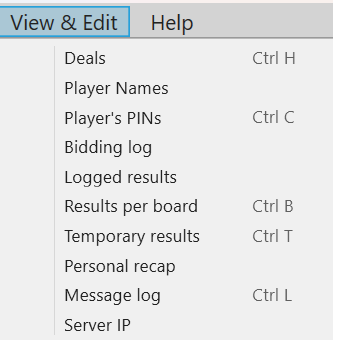
Deals are explained on a separate page.
Player names displays the ID-numbers that the players have registered at the start and their corresponding names (if available). You can also edit the names in this dialog. See the Player Names page for details.
Player PINs displays the TD's and the players' PIN codes.
Bidding log opens a file with all auction details listed. This list is useful at rulings and to settle arguments.
Logged results This command will list the results that the tabletops have sent to BTC in chronological order. The function is useful as a last resort if you, for example, accidentally have updated the movement from round 1 (i.e. you have erased all results in the database).
Results per board can be used to view and amend results and/or biddings. The function is explained on a separate page.
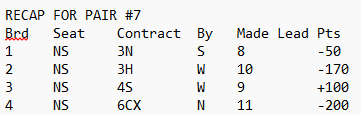
Personal recap is a summary of one pair’s results presented in printable text file format. Note that this option will be enabled when a pair is highlighted in the main user interface.
Message log is a list of the communication with the tables. It can be useful when you want to find out why things went wrong. It is not obvious how to read the log, which is intended for advanced users. You should file a Report Problem if you need advice.
Server IP displays a list of the IPs that BTC has used during the event. It can be useful to know which IP that was used at the start if COM is lost with the tables.
The current IP (on the first line if there are several) should be the same as the tables have connected to. c.f. Network in BT’s help.
|